
Transition
Transition lets a platform administrator migrate many datasets from one embedder to another in a single operation — a process also known as bulk reindexing. Every dataset currently using the source embedder is reindexed onto the target embedder, rebuilding its search index with the new embedding model and the target's recommended chunking.
What it does
Instead of reindexing assistants one by one, you pick a source and a target embedder once and let QAnswer fan out across every matching dataset. The job runs in the background and persists its progress, so you can leave the page and come back later.
- Serial by default — datasets are reindexed one at a time, so a single failure only affects that dataset — the rest of the job keeps going.
- Safe skips — datasets that are mid-upload or already being reindexed are skipped rather than corrupted.
- Fully tracked — every dataset gets its own row with a live status, elapsed time and any error, all visible from the job details.
Before you start
- You must be signed in as a platform administrator.
- At least two active embedders must exist — a source to migrate away from and a target to migrate to. If only one is available, add or activate another embedder first.
Step 1 — Choose source and target
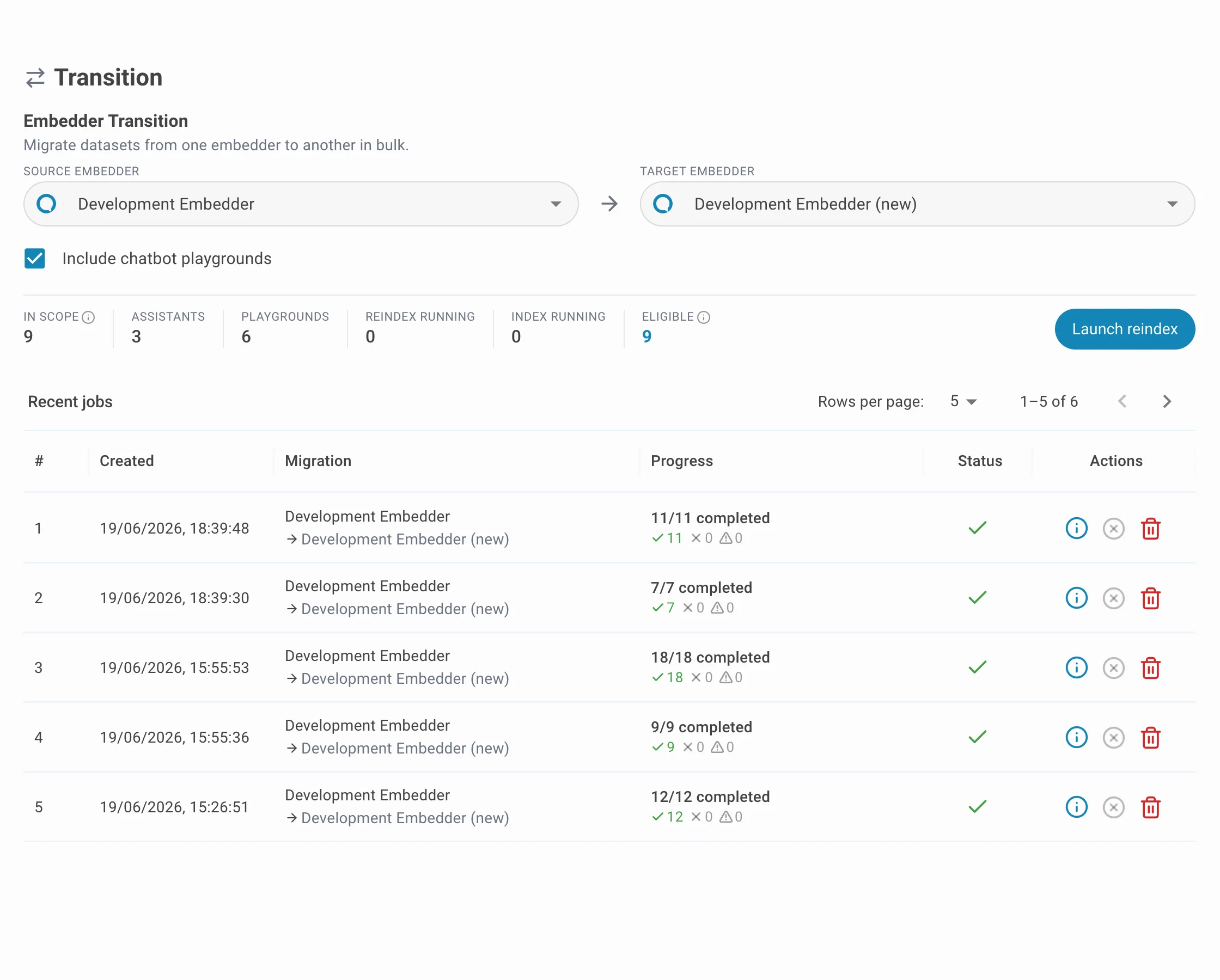
In the Embedder Transition section, configure the migration:
- Source embedder — the embedder you are migrating away from. Every dataset using it becomes a candidate.
- Target embedder — the embedder to migrate to. The target's recommended chunking is applied during reindexing.
- Include chatbot playgrounds — when ticked, chatbot playground datasets are migrated alongside regular assistants; otherwise only assistants are.
Step 2 — Review the scope
As soon as both embedders are selected, the scope preview updates with a live count of how many datasets will be affected. Use it to confirm the migration before launching.
| Metric | Meaning |
|---|---|
| In scope | Total datasets using the source embedder (assistants + playgrounds). |
| Assistants | In-scope datasets that are regular AI assistants. |
| Playgrounds | In-scope chatbot playground datasets (counted only when "Include chatbot playgrounds" is ticked). |
| Reindex running | Datasets already being reindexed by another job — they will be skipped. |
| Index running | Datasets with a connector mid file-ingestion — they will be skipped. |
| Eligible | Datasets that can be reindexed right now = In scope − Reindex running − Index running. |
Step 3 — Launch and confirm
Click Launch reindex. A confirmation dialog summarises the migration — source and target names, their embedding size (dimensions) and context window (tokens), plus the same scope counts. Review it and click Confirm to start the job.
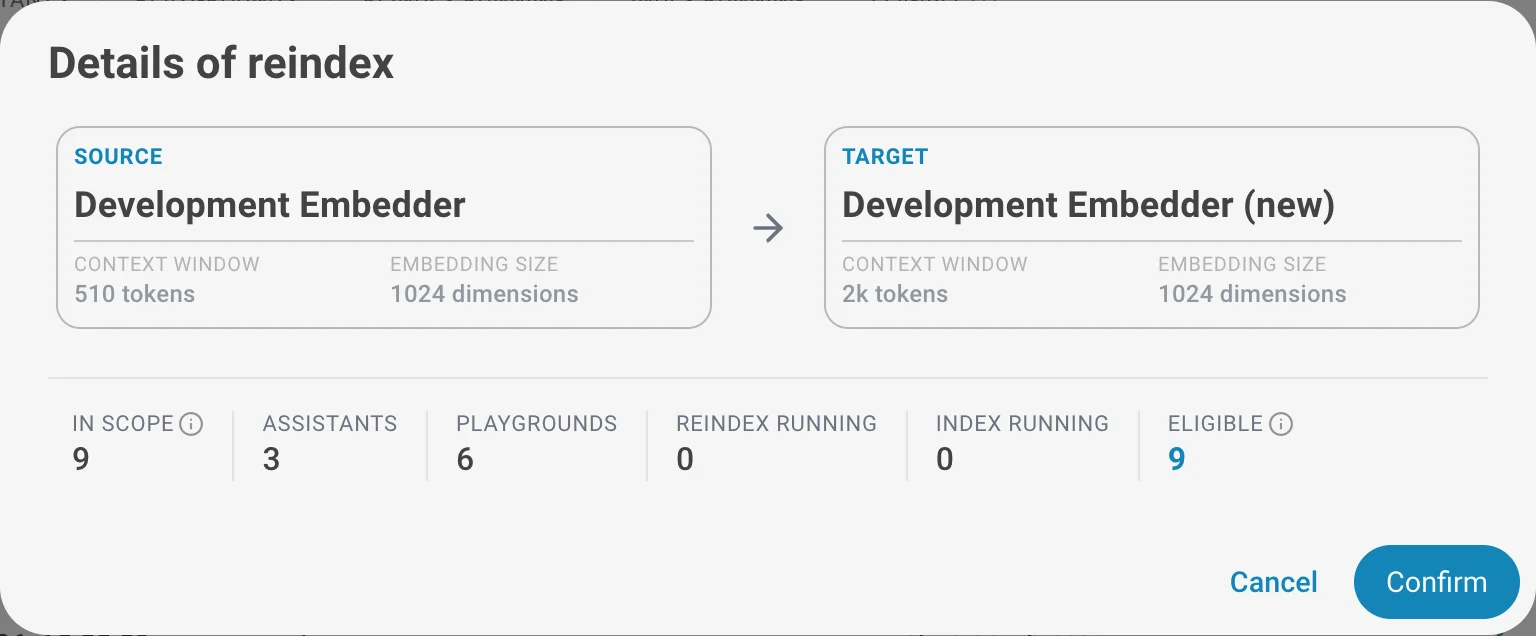
The job is created immediately and starts processing datasets in the background. You can close the dialog and track progress in the Recent jobs table below.
Step 4 — Track progress
The Recent jobs table lists every bulk job with its creation time, the source → target migration, a progress bar (completed / total, with succeeded, failed and skipped counts) and an overall status.
A job moves through these statuses:
| Status | Meaning |
|---|---|
| Pending / Running | The job is queued or actively reindexing datasets. |
| Succeeded | Every dataset finished without a failure. |
| Partially failed | Some datasets succeeded and some failed. Open the job to see which. |
| Failed | No dataset succeeded. |
| Cancelled | The job was cancelled before all datasets were processed. |
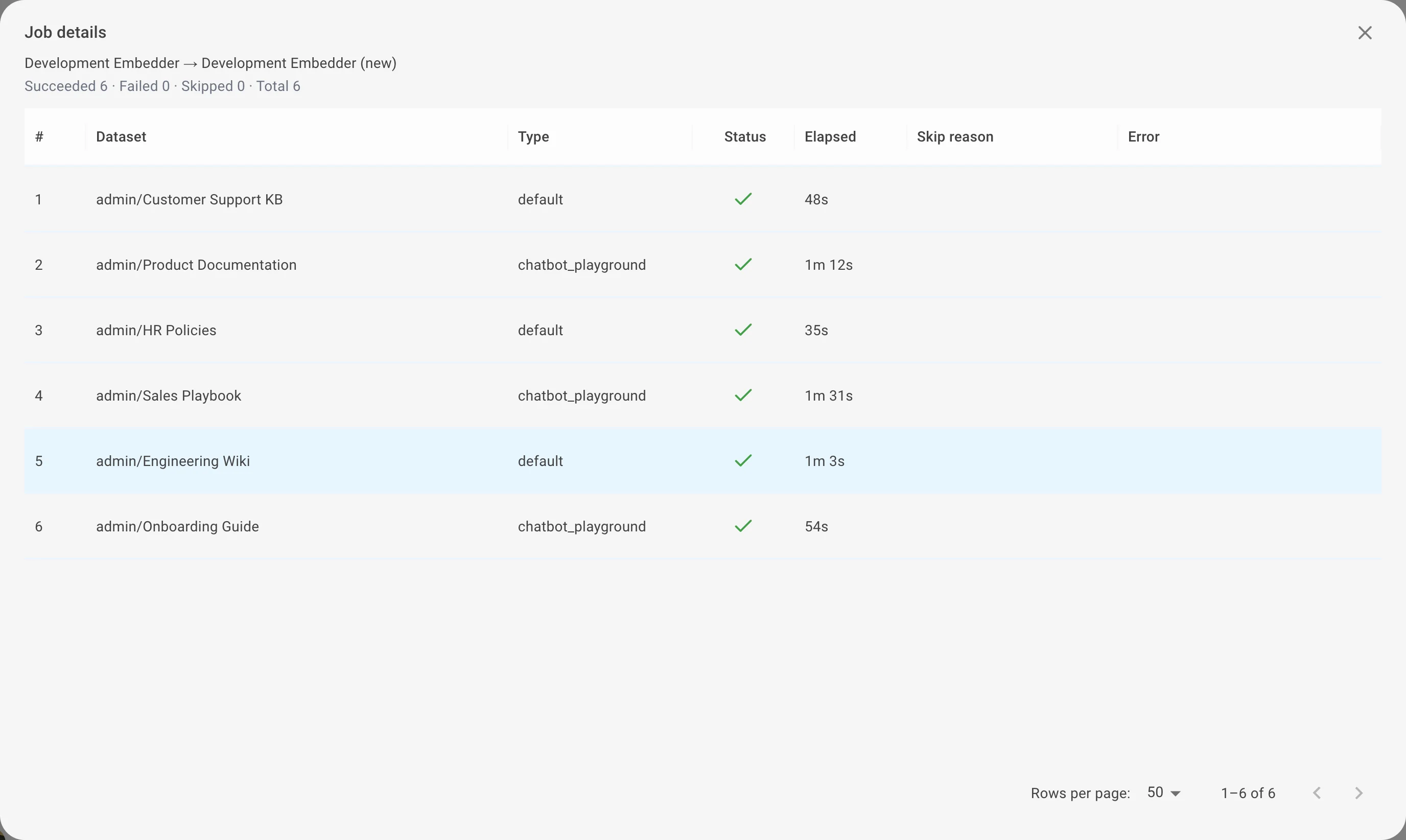
Click Open on any job to see the per-dataset breakdown — each dataset's name, type, status, elapsed time, the skip reason (if it was skipped) and the error message (if it failed).
Understanding skipped datasets
A dataset can be skipped to protect its data. A skip is not an error — the dataset is simply left untouched, with the reason recorded in the job details.
| Skip reason | Meaning |
|---|---|
| No search index | A playground that has no search index yet. The new embedder is saved for its next upload, but there is nothing to reindex right now. |
| Reindex running | The dataset is already being reindexed by another job. |
| Index running | A connector is mid file-ingestion. Reindexing now would drop the in-flight files, so the dataset is skipped. |
| Dataset deleted | The dataset was removed between submitting the job and processing it. |
| Cancelled | The dataset was still pending when the job was cancelled. |
Managing jobs
- Open — view the job details and the per-dataset item list.
- Cancel — available while a job is still active. Datasets already reindexing finish normally; the remaining pending ones are marked cancelled.
- Unblock — recover a job whose datasets appear stuck, releasing them so processing can resume.
- Delete — available only for finished jobs. Removes the job record and its item history; it does not undo a completed reindex.