
Architecture
QAnswer can be self-hosted on your own infrastructure via Docker Compose, giving you full control over data residency, networking, and scaling. This page covers the system architecture, requirements, and a quick start for deploying the bundle.
Architecture of the application
Here is a diagram explaining the overall architecture of the QAnswer application:
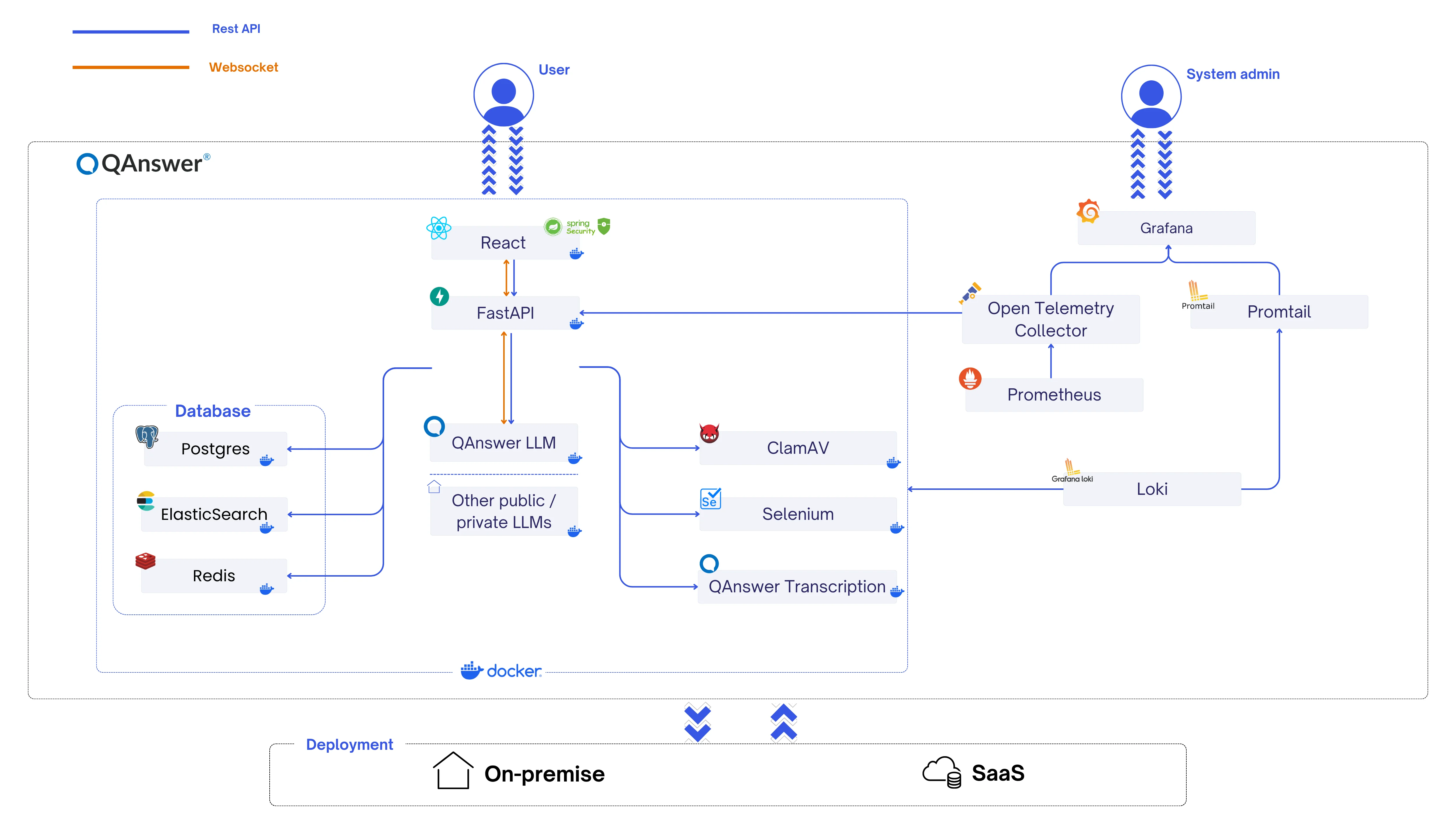
The global architecture of QAnswer is composed of 3 parts:
- Nginx WAF — responsible for external routing, Web Application Firewall, and TLS/SSL management.
- QAnswer Core — the functional part of QAnswer providing the required functionalities.
- QAnswer Monitoring — responsible for monitoring the status of QAnswer.
QAnswer Core is composed of the following services:
- Traefik — load balancer for internal traffic routing;
- QAnswer Frontend — the web GUI of the application;
- QAnswer Doc — the documentation site you're reading right now;
- QAnswer Python Backend — entrypoint of the backend, responsible for security, authentication, authorization, AI models, and indexing;
- QAnswer LLM — the large language model serving layer;
- QAnswer Embedder — the embedding model used for semantic search;
- QAnswer Transcription — speech-to-text;
- Clamav — checks uploaded files for viruses;
- Selenium — web scraping;
- PostgreSQL — SQL data storage;
- Valkey — key/value store for caching and queuing;
- ElasticSearch — document/vector storage for retrieval.
Requirements
Hardware
- 16 GB RAM
- 200 GB disk
- 48 GB vRAM GPU
Software
- Any Linux distribution
- Docker version 20 or newer
- Docker Compose
- The nvidia-container-toolkit installed, to use NVIDIA GPUs in a container
- A licence key, plus a username and access token (provided by us)
(This supports 7 to 13 concurrent users depending on RAG or Chat workload. Contact us at info@the-qa-company.com for help sizing your infrastructure.)
Quick start
Once you have your licence key and registry credentials, deploying the bundle takes a few steps:
1. Clone the bundle repository
git clone -b main https://gitlab.the-qa-company.com/qanswer-app/qanswer-bundle.git
cd qanswer-bundle
2. Set your credentials
export QANSWER_KEY=YOUR_KEY
export HUGGINGFACE_TOKEN=YOUR_HF_KEY
YOUR_KEY is your licence key; YOUR_HF_KEY is the Hugging Face token we provide.
3. Log in to the image registry
docker login -u $QANSWER_REGISTRY_USER -p $QANSWER_REGISTRY_PASSWORD \
  https://registry.gitlab.the-qa-company.com:443/v2/qanswer-app
QANSWER_REGISTRY_USER and QANSWER_REGISTRY_PASSWORD are the docker registry credentials we provide.
4. Download all images
./init.sh5. Start QAnswer
./deploy-scripts/up.sh

# or manually:
docker compose up -d
6. Open your browser at http://localhost:4567/
7. The default login is username: admin / password: 123456