
PII Masking
Some models in the chat are protected by PII masking. Before your question leaves QAnswer, names, e-mail addresses, phone numbers and other personal details are replaced by neutral labels. The model only ever sees the labels, and QAnswer puts the real details back into the answer.
Your administrator decides which models are protected. You have nothing to switch on.
An example
1
You write
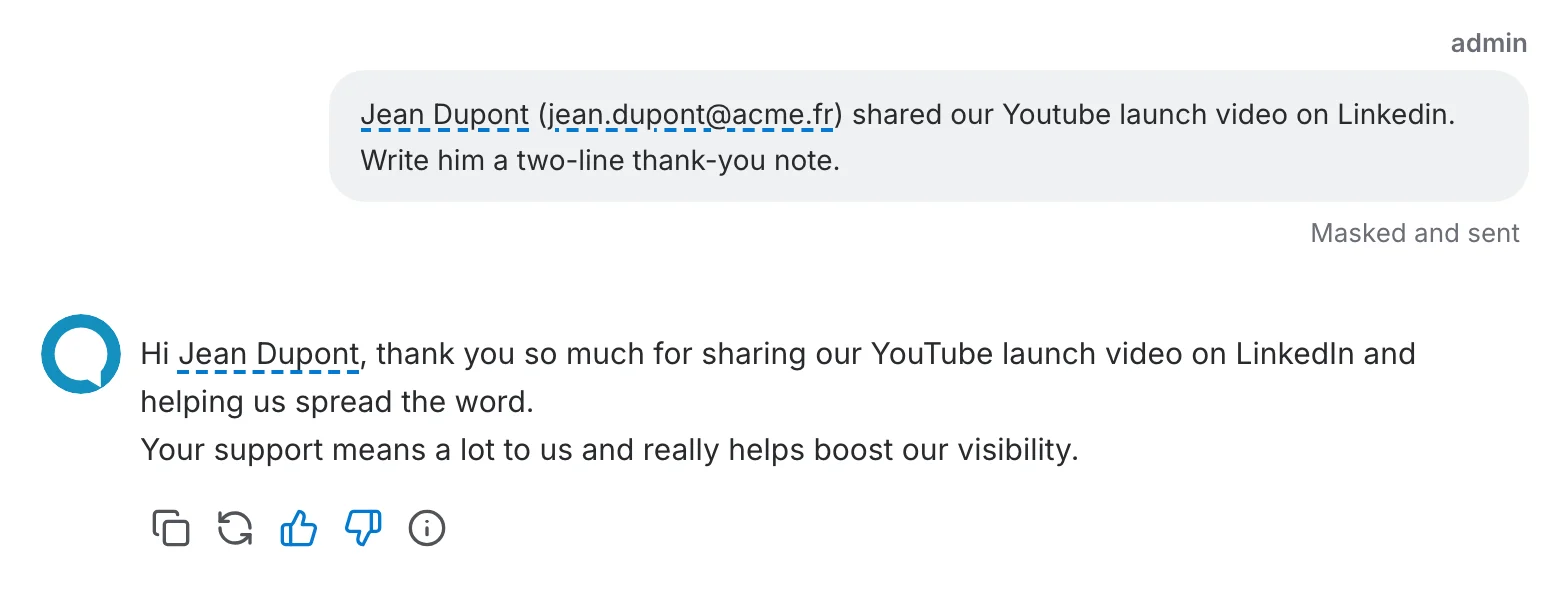
Jean Dupont (jean.dupont@acme.fr) shared our Youtube launch video on Linkedin. Write him a two-line thank-you note.
QAnswer replaces the personal details by labels before the question leaves.
2
The model receives
<PERSON_NAME_1> (<EMAIL_ADDRESS_1>) shared our Youtube launch video on Linkedin. Write him a two-line thank-you note.
3
The model answers
Hi <PERSON_NAME_1>, thank you so much for sharing our Youtube launch video on Linkedin and helping us spread the word.
QAnswer puts the real details back as the answer arrives.
4
You read
Hi Jean Dupont, thank you so much for sharing our Youtube launch video on Linkedin and helping us spread the word.
What you notice
- While you type — personal details get a blue dashed underline and a counter under the chat bar says how many sensitive fields were found. Hover a detail to see what kind of data it is.
- After sending — your message stays as you wrote it, with the note "Masked and sent". Hover a detail to see the label the model received.
- In the answer — personal details are underlined the same way, whether they come from your question or the model wrote them itself.
Good to know
- Masking is a rule of the model, not a setting of the conversation: it cannot be switched off for a single question.
- Your documents are protected the same way: the passages the assistant quotes from them and the files you attach reach the model with the personal details replaced by labels.
- You have the last word: hover a detail and click Don't mask, or select text and click Mask as…. Your administrator can also list terms that are always or never masked.
- Brand and product names are not personal data and stay as they are. Now and then one is taken for a person's name; the underline shows you when.
- If the detector is unavailable, the question is not sent at all and you see an error. A question never goes out unmasked.
Read more
What counts as personal data, how administrators switch it on and how good the detector is: PII masking in the LM Providers section.